How to copy screenshots and errors to coding agents
Ctrl+V pastes a screenshot into Claude Code. But by the time I ask for a fix I've copied three things from three apps. A prompt hook hands the agent all of them, so the prompt is just "fix this error".
Key findings
- Over five weeks, a prompt hook gave my coding agents what I had just copied with 274 prompts. Under its current three-clip cap, more than one in four of those prompts carried several clips, and 18% mixed apps: a screenshot, a console line, a terminal command.
- Screenshots go to the agent as their text plus the image's file path. When the path was there, the agent opened the image only 6 times out of 70. The text was enough, at no more than about 150 tokens instead of roughly 1,500 for the image.
- It stays small on purpose: at most three recent clips and 600 bytes, each sent once, nothing marked sensitive, and nothing at all in a very large session unless you ask for it.
Here's a bug report I used to write several times a day.
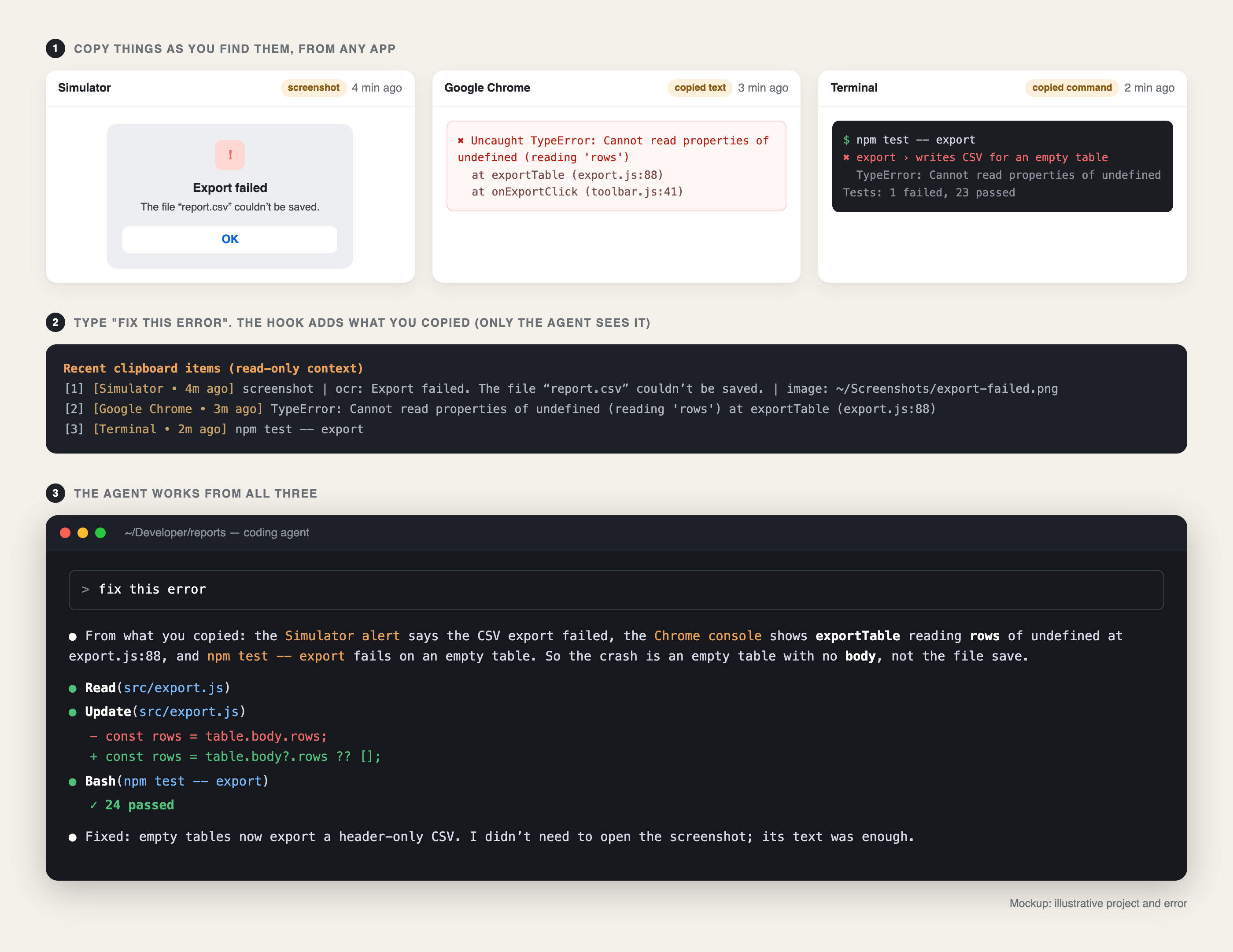
The export fails in the simulator. I take a screenshot of the alert. I switch to Chrome, open the console and copy the stack trace. I switch to the terminal, scroll up and copy the test command that failed. Then I go back to Claude Code and start assembling: Ctrl+V for the screenshot, then the stack trace, then the command, then a sentence explaining how they fit together.
To be fair to Claude Code, the pasting part works. On a Mac, Ctrl+V (not ⌘V, which is the terminal's own text paste) attaches the image on your clipboard to your prompt. But the clipboard only holds the last thing you copied. By the time I was ready to ask, the screenshot had been replaced by the stack trace, and the stack trace by the command. So either I went back and copied each one again, in order, or, more often, I didn't bother. I described the error in words, and the agent guessed.
Now I copy things as I find them and type "fix this error".
Why the agent can't just see it
A coding agent knows two things: what's in your prompt and what it reads with its own tools. It can open any file in your repository, run your tests and read git history. It can't see your clipboard, the browser console you were looking at or the alert in the simulator. Everything you saw on the way to asking has to be carried across by hand.
But your Mac has already seen it. If you use a clipboard manager, every one of those copies is sitting in its history, with the app it came from and when. The missing step is getting the relevant few into the agent's context at the moment you ask.
A prompt hook carries it across
Claude Code hooks run a script at fixed moments, and one of those moments is just before your prompt is sent. A UserPromptSubmit hook can add text to the agent's context alongside your message. Codex has the same kind of hook.
That's where L2Cache, the Mac app I build, hands over what I've copied. When I type a prompt, the hook looks at my recent clips and adds a short, labelled block. For the bug above, the block looks like this (same illustrative example as the picture):
Recent clipboard items (read-only context; mention any that are relevant to your task):
[1] [Simulator • 4m ago] screenshot | ocr: Export failed. The file "report.csv" couldn't be saved. | image: ~/Screenshots/export-failed.png
[2] [Google Chrome • 3m ago] TypeError: Cannot read properties of undefined (reading 'rows') at exportTable (export.js:88)
[3] [Terminal • 2m ago] npm test -- export
Each line says where the clip came from and how long ago, because that's half the meaning. A stack trace copied from Chrome a minute ago is probably the error you mean. The same text copied from Slack yesterday probably isn't.
Screenshots: text first, pixels only if needed
A screenshot is the one clip you'd think needs the image itself. Usually it doesn't. Most error screenshots are mostly text: an alert, a log, a console panel, a failing test in Xcode. So the hook sends the text found in the screenshot, a short title and, when the screenshot was saved to my screenshots folder, the path to the file. If the text is enough, the agent just uses it. If it needs to see the layout or a colour, it opens the file itself.
It turned out the agent almost never needs to. Of 70 prompts where a screenshot came with its file path, the agent opened the image 6 times. The other 64 times the text answered the question.
That matters more than it looks. A typical screenshot of mine costs roughly 1,500 tokens as an image. Its text, cut down to fit the hook's budget, costs at most about 150. And whatever enters the context stays there: it's resent with every later request in the session, and re-read in full after a break once the prompt cache has expired. (I measured what that costs in a separate write-up.) Sending ten times less for the same answer adds up over a long session.
| Image | Text + file path | |
|---|---|---|
| Typical cost | ~1,500 tokens | ≤ ~150 tokens |
| Agent can read the error text | Yes | Yes |
| Agent can see the layout | Yes | If it opens the file |
| Times the agent opened the file | n/a | 6 of 70 |
What I measured
I went through five weeks of my own Claude Code transcripts (October 7 to November 13) and counted what the hook actually passed along.
- 274 prompts went out with clips attached, 627 clips in total.
- Several clips at once: since the hook was capped at three clips, 56 of 202 prompts (28%) carried more than one, and 37 (18%) mixed clips from different apps. That's exactly the case Ctrl+V can't cover, because the clipboard only holds one thing. (An earlier version sent up to nine clips; I've left those prompts out of these two numbers.)
- 19% of clips were screenshots, and most of those came with their file path.
- The apps were mostly my terminal, Chrome, my editor and the L2Cache app itself, with a long tail of ChatGPT, screen sharing and remote desktop sessions.
The prompts changed too. Among them: "see the screenshot", "i copied the screenshots", "i copied the correct card, use this for the mockup". None of those would mean anything to an agent on its own. With the clips attached, each one was a complete request.
Keeping it small
Anything a hook adds rides along on every later request, so a hook that dumps your whole clipboard into the context would make things worse, not better. Most of the design is about what not to send:
- Recent only. Clips copied in the last 30 minutes, and of those, only ones from the last ten minutes or ones that share a word with your prompt.
- Capped. At most three clips and 600 bytes, enforced in the hook, not left to good intentions.
- Sent once. A clip that's already been given to this session isn't repeated with the next prompt.
- Quiet when the session is huge. In a very large session, clips are skipped unless the prompt mentions copying, pasting, the clipboard or "this error".
- Labelled as context, not instructions. Copied text can contain anything, so the block tells the agent it's read-only reference.
- Nothing sensitive. Clips L2Cache marks as sensitive, like passwords and keys it recognises, are never passed on. Recognition isn't perfect: while I was writing this, a freshly generated API key got through, and I'm tightening that check.
The takeaway
The agent doesn't need you to paste. It needs what you already saw.
Ctrl+V is fine for one screenshot. Real debugging is a trail of copies across three or four apps, and the clipboard forgets all but the last. Hand the agent the last few things you copied, small, recent and labelled, send screenshots as text with the file one step away, and "fix this error" becomes a complete bug report.
Frequently asked questions
How do I paste a screenshot into Claude Code on a Mac?
Copy the screenshot (⌘⇧⌃4 copies a selection straight to the clipboard) and press Ctrl+V in Claude Code, not ⌘V. ⌘V is the terminal's text paste; Ctrl+V lets Claude Code read the image from the clipboard and attach it to your prompt.
Can Claude Code see my clipboard?
Not by itself. It only sees what you paste and what a hook adds to your prompt. A UserPromptSubmit hook can read your recent clips, for example from a clipboard manager, and add the relevant ones as context.
Is it cheaper to send a screenshot's text than the image?
Usually much cheaper. In my clips a screenshot cost roughly 1,500 tokens as an image and about 150 as text, and the agent needed the image itself only 6 times in 70.
Does this work with Codex too?
Yes. Codex supports the same kind of prompt hook, and L2Cache installs the same one there, so both agents get the clips you copied.
More on what belongs in an agent's context, and what it should look up instead: How I built shared memory for Claude Code and Codex.
L2Cache hands Claude Code and Codex what you just copied: errors, commands and screenshots as text.
Download L2Cache for Mac