How to Stop Hitting Claude Pro Weekly Limits in Claude Code (Without Upgrading to Max)
If you use Claude Code daily on a Claude Pro ($20/mo) or Team plan, you have likely encountered the dreaded wall: "You have reached your weekly limit. Limits reset in 3 days."
Even worse, developers often notice that a single casual message—sent after lunch or the next morning to ask "what should we do next?"—instantly burned 10% to 15% of their remaining quota. You didn't write thousands of lines of code; you just hit Return.
The Root Cause: Anthropic's prompt cache has a strict Time-to-Live (TTL). On Claude Pro/Team subscriptions, KV-cache records expire after 60 minutes of inactivity (and just 5 minutes on direct API keys). Resuming an expired session triggers a full cold cache-creation rewrite of your entire conversation history.
The Hidden Math of the Cold Resume Spike
Anthropic's prompt caching pricing structure gives you a 90% discount on cache reads (0.1× input cost). But writing a new cache costs 1.25× the base input token price. During an active coding session, turns cost very little because 99% of your context is read from warm cache.
The moment you step away for 61 minutes, the cache drops out of memory. Here is what happens when you resume a 140,000-token conversation:
| Metric | Active Warm Turn (<60m) | Cold Resume Unprotected (>60m) | With L2Cache (+98% Saved) |
|---|---|---|---|
| Tokens Reloaded | 140,000 cached reads | 140,000 cache writes | ~3,000 distilled tokens |
| Weighted Cost Multiplier | 0.1× input cost | 1.25× input cost (12.5× jump) | 1.0× fresh input cost |
| Effective Token Hit | ~14,000 tokens | ~175,000 tokens | ~3,000 tokens |
| Quota Consumed | <0.5% of 5-hr window | 5%–7% of 5-hr limit (~2% weekly) | <0.1% of quota |
| Token Reduction | Baseline | 0% (Maximum penalty) | ~98% reduction |
A single prompt in an expired 140k session reloads all 140,000 tokens at cache-creation rates—burning 175,000 equivalent input tokens. Do that 4 or 5 times across a week of development, and roughly 10% to 15% of your Claude Pro weekly budget is burned purely on cache rewrites rather than actual code.
The Math: Why Saving 15% Means One Extra Coding Day Every Week
On a 7-day weekly schedule, each full day represents roughly 14.3% of your weekly token allowance (100% ÷ 7). When cold resumes burn 10% to 15% of your weekly budget reloading expired context, you are effectively losing an entire day's worth of coding every week to cache penalties.
Eliminating those cold reloads recovers that 15%—which is why spending $9.99 once on L2Cache literally hands you one extra coding day every single week.
Why Anthropic Tells You to Upgrade to $100/mo Claude Max
When you hit the weekly wall, the default suggestion in community forums and UI banners is: "Upgrade to Claude Max for 5× higher weekly limits ($100/month)."
For most individual developers, paying $1,200/year for an AI subscription is frustrating when 60% of that spend is wasted on cold reloads that could have been avoided with proper session hygiene.
The $10 vs $100/mo Anchor: Instead of paying $100 every single month to brute-force through cache penalties, L2Cache costs $9.99 one-time ($19.99 regular). It pays for itself in the first week by keeping your Claude Pro account comfortably under quota.
The Solution: L2Cache Developer Memory for Mac
L2Cache is the native macOS developer memory application built to eliminate cold session token penalties and connect your daily coding context. Instead of letting Claude burn half your weekly limit reloading conversations, L2Cache gives you complete control over session lifetime:
- Proactive Menu-Bar Expiry Warnings: A live countdown badge in your macOS menu bar warns you when a heavy session's cache is approaching the 60-minute cutoff, so you know whether your session is warm before you step away or resume.
- Automated /clear Session Handoff: When resuming an expired session, L2Cache generates a compressed context handoff containing your active goal, modified files, git status, and uncommitted diffs. Typing
/clearstarts fresh at ~3,000 tokens instead of rewriting 175,000 tokens—saving 98% of your resume quota. - 12-Tool Local MCP Server: Never keep massive 150k-token sessions alive just so Claude "remembers" what happened yesterday. Claude queries L2Cache on-demand for past clips, terminal outputs, error resolutions, and recovery points in tiny 160-token lookups.
- Multi-Agent Memory & ⌘K Search: Connects Claude Code, OpenAI Codex, GitHub Copilot, Grok, and Antigravity into one local SQLite FTS5 index.
- Zero Background Token Drain: Operates 100% locally on your Mac. It makes zero background API calls and burns exactly 0 tokens while you sleep.
Free Open-Source Alternative: Cold-Resume Guard CLI
If you don't need the full macOS app and simply want a lightweight, terminal-only prompt interceptor in your shell, we also created and open-sourced Cold-Resume Guard (cold-resume-guard) as a free alternative under the MIT license:
- Deterministic Disk Inspection: The CLI hook reads
~/.claude/projects/JSONL transcripts locally to check when your session was last active without network calls. - Shell-Level Interception: When resuming an expired session, it pauses your prompt before sending anything over the wire, alerting you to the exact quota penalty right in your terminal:
⚠️ Claude Cold-Resume Guard: Context: 142,800 tokens | Cache expired 2h 15m ago. Resuming will reload ~178,500 weighted tokens (~6% of 5-hr limit). [↑ Return to proceed anyway | Type /clear for clean handoff (~3k tokens)] - CLI Handoff: Typing
/clearcopies a clean git context handoff to your clipboard to resume in a fresh session at ~3k tokens.
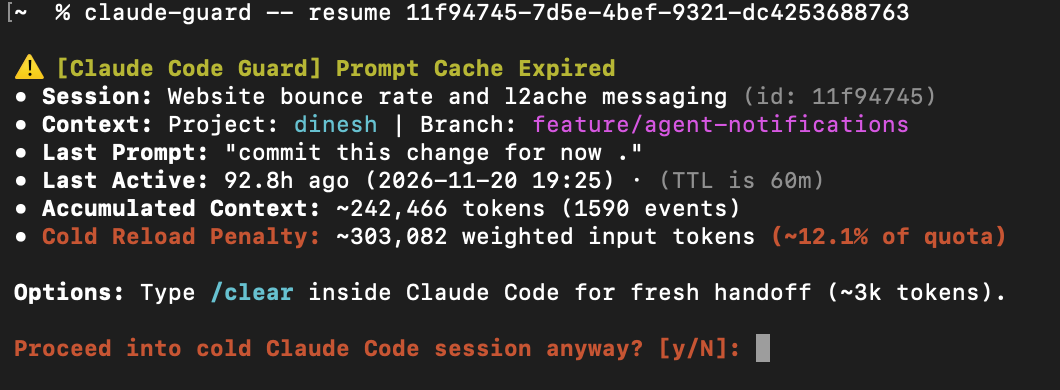
Cold-Resume Guard intercepts expired sessions in real time, displays weighted quota penalty, and copies a clean git handoff to the clipboard.
📦 Standalone Open-Source Alternative
For developers who want a quick, terminal-only guard without the macOS app, install our free open-source companion tool:
brew install l2cache-app/tap/cold-resume-guard && cold-resume-guard --setupWhy Keepwarm Plugins & Heartbeat Daemons Fail
Some developers attempt to solve cache expiry using /keepwarm scripts or background cron jobs that ping Claude Code every 4 minutes. Here is why that backfires:
- Exhausts Quotas While You Sleep: Pinging a 120k session 15 times an hour burns 1,800,000 cache-read tokens per hour. Over 8 hours of sleep or a weekend trip, that script burns 14.4M to 43M tokens, guaranteeing you wake up to a locked account.
- Rate-Limit Throttling: Frequent background pings count against your requests-per-minute (RPM) and tokens-per-minute (TPM) limits, causing sudden 429 rate limit exceptions when you actually sit down to code.
- Zero Background Drain: Both L2Cache and the open-source CLI guard burn 0 background tokens. They never ping Anthropic APIs in the background. Protection triggers only when you interact.
Feature Comparison: Keeping Claude Code Under Limits
| Capability | Manual /compact | Keep-Warm Daemons | Cold-Resume Guard (CLI Alternative) | L2Cache (Main Mac App) |
|---|---|---|---|---|
| Catches Expired Resumes | No (Only before leaving) | No (Fails on sleep/network drop) | Yes (Halts at prompt time) | Yes (Menu-bar + CLI + UI) |
| Background Token Drain | 0 tokens | 1.8M – 36M tokens / day | 0 tokens (100% passive) | 0 tokens (100% passive) |
| Proactive Menu-Bar Alerts | No | No | No (Terminal only) | Yes (Live countdown badge) |
| Multi-Agent Memory & ⌘K | None | None | None | Claude, Codex, Copilot, Grok |
| 12-Tool Local MCP Server | No | No | No | Included (Recall on-demand) |
| Pricing | Free | Burns API quota | Free, open source (MIT) | Free download · $9.99 once |
3 Rules to Never Hit the Limit Again
- Compact Before Lunch: If you are actively in a session above 80k tokens, run
/compactwhile the cache is still warm. Compaction costs 10× less while warm than waiting until the session is cold. - Start Fresh After Breaks: If you return to a terminal after more than 60 minutes, don't ask a one-line question to warm it up. Use L2Cache (or the free Cold-Resume Guard CLI) to inject a clean
/clearhandoff and continue with ~3k tokens. - Search Past Work Instead of Holding Large Sessions: Don't keep a massive 180k session open just so Claude "remembers" what happened yesterday. Use L2Cache's built-in MCP server: let Claude pull past decisions, error resolutions, and file diffs on-demand with small 160-token queries.
Download L2Cache on the Mac App Store. Includes unlimited local clipboard history and a 15-day free trial of Developer Pro.
Download L2Cache for Mac